Trading App & Web Platform: 0→1
Building a trading experience from scratch – navigating technical constraints, legacy design, and zero internal expertise to deliver a product that became a critical milestone for the company.
Product type
Trading / Fintech
Role
Lead Product Designer
Timeline
12 months to MVP
Platform
Cross-platform Mobile + Web
Company
IronFX
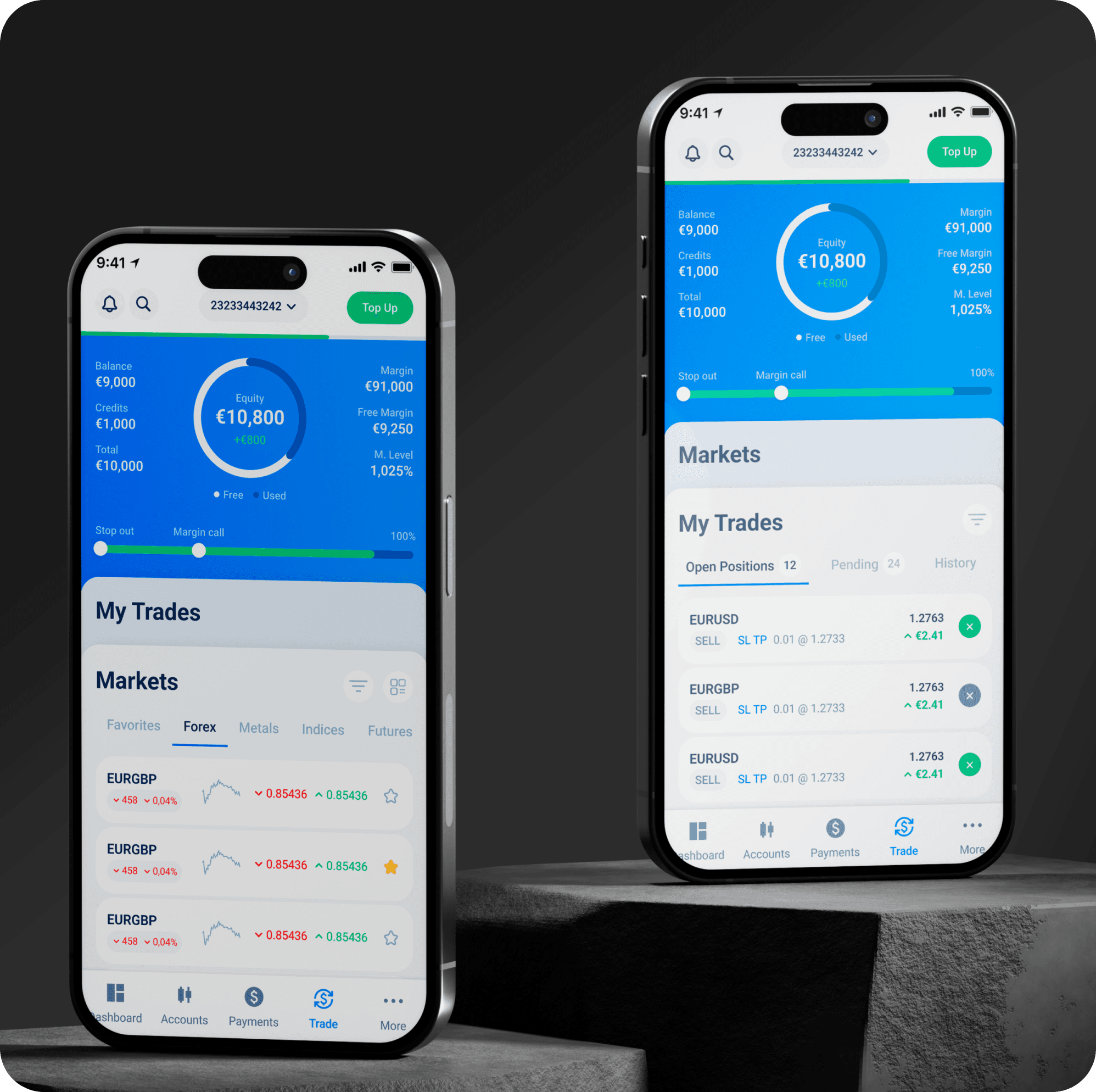
Problem & Goal
A forex company with multiple broker brands had a client portal and a mobile app, but no trading interface of its own. Clients used third-party platforms like MT4 and MT5 to trade separately – creating a fractured experience with little reason to stay loyal. The company was falling behind competitors and leaving commission revenue on the table.
The task: design a trading platform from zero – no prior research, no internal trading UX expertise, no established design direction.
User Needs
Have a single place to manage money and trade without switching between apps
Work with a modern, intuitive interface rather than complex legacy software
Understand what they're doing, especially as a beginner entering trading for the first time
Complete key actions (deposit, trade, review) quickly and without confusion
Access the right set of trading tools, focused and fast, without overwhelming complexity
Business Goals
Build a proprietary trading experience to reduce dependence on third-party platforms
Attract and retain more broker clients by offering a competitive, integrated product
Increase trading commission revenue by removing friction from the trading journey
Stop losing ground to competitors who already offer first-party trading platforms
Create a foundation that can scale across multiple broker brands under the company's umbrella without spensing time for creating from scratch
Project Constraints
Legacy design: New interface had to connect stylistically to an existing app from 5–6 years ago. Full redesign was not on the table — yet.
No internal expertise: No one inside the company had deep trading UX experience. I learned the domain from scratch while designing it.
No access to real brokers: Company policy restricted direct access. Relied on analyst data, independent research, and interviews with traders in my personal network.
Technical limitations: Trading platform rules restricted certain solutions. Multi-account switching initially flagged as too complex to implement — required building a business case.
Resource instability: Dev team frequently reassigned to other projects. PMs changed mid-project. Total timeline: 12 months to MVP.
My Role
Led end-to-end design of the product — full ownership of UX, UI, flows, prototypes, and final output. One other designer was involved in ideation discussions and reviews.
UX & UI ownership
From first sketch to final screen — research, flows, wireframes, visual design, design system.
Cross-functional collaboration
Daily work with PMs and engineers. Presented to stakeholders to secure dedicated dev team. Resolved technical constraints with user data.
Research & testing
Ran usability testing (Userberry), video sessions and heatmaps (Mouseflow). No dedicated analyst — owned the data end-to-end.
Developer handoff & QA
Annotated Figma files, clickable prototypes, and regular Design QA sessions after implementation.
How We Defined Success
This was a 0→1 project — no post-launch analytics yet. Before opening Figma, I aligned with PMs on how we'd know the product achieved its goals:
Task completion rate across 5 core flows — can users actually trade without confusion?
Error rate and drop-offs on deposit and order placement — the two highest-revenue actions
SUS score after usability testing — do users find the product easy enough to replace what we have?
Feature adoption post-launch — are brokers using the product or defaulting back to third-party tools?
Product generates requests for v2 features — signal that the core is working
Design Workflow
Every step was data-driven and aligned with business goals. Research informed flows, flows informed wireframes, wireframes were tested before visual design, and visual design was validated before handoff.
Stage 1: Market & Competitor Research
Studied trading mechanics, competitive products (30+), built personas. Interviewed traders from personal network.
Stage 2: MVP Scoping & Prioritisation
Aligned on revenue model. Applied MoSCoW with PM. Presented to stakeholders to secure dedicated dev team.
Stage 3: User Flows
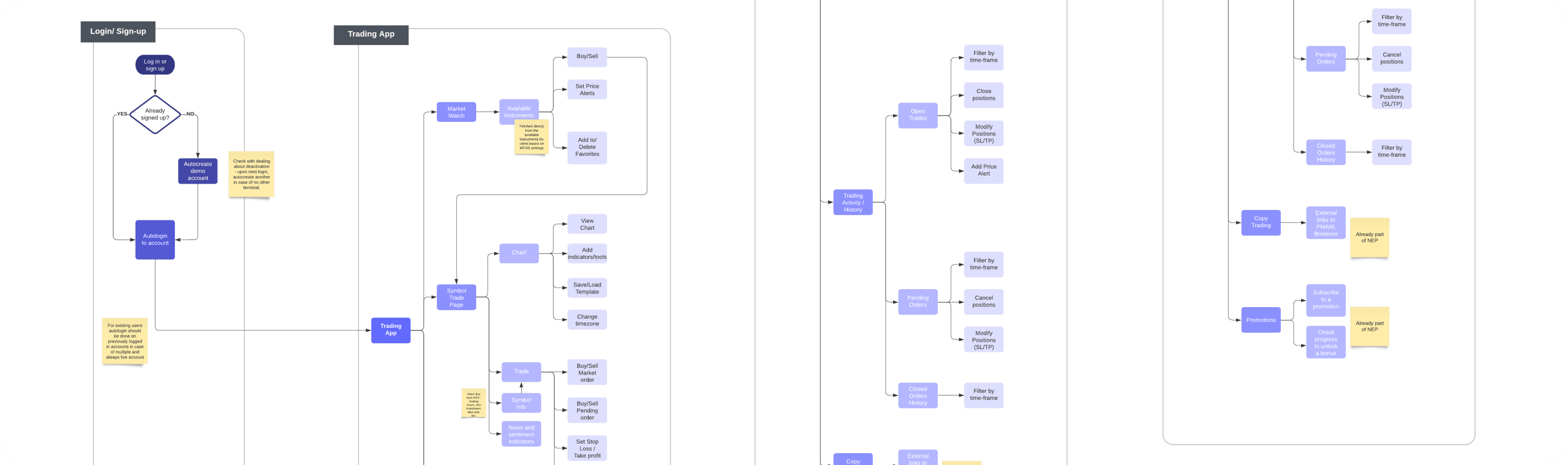
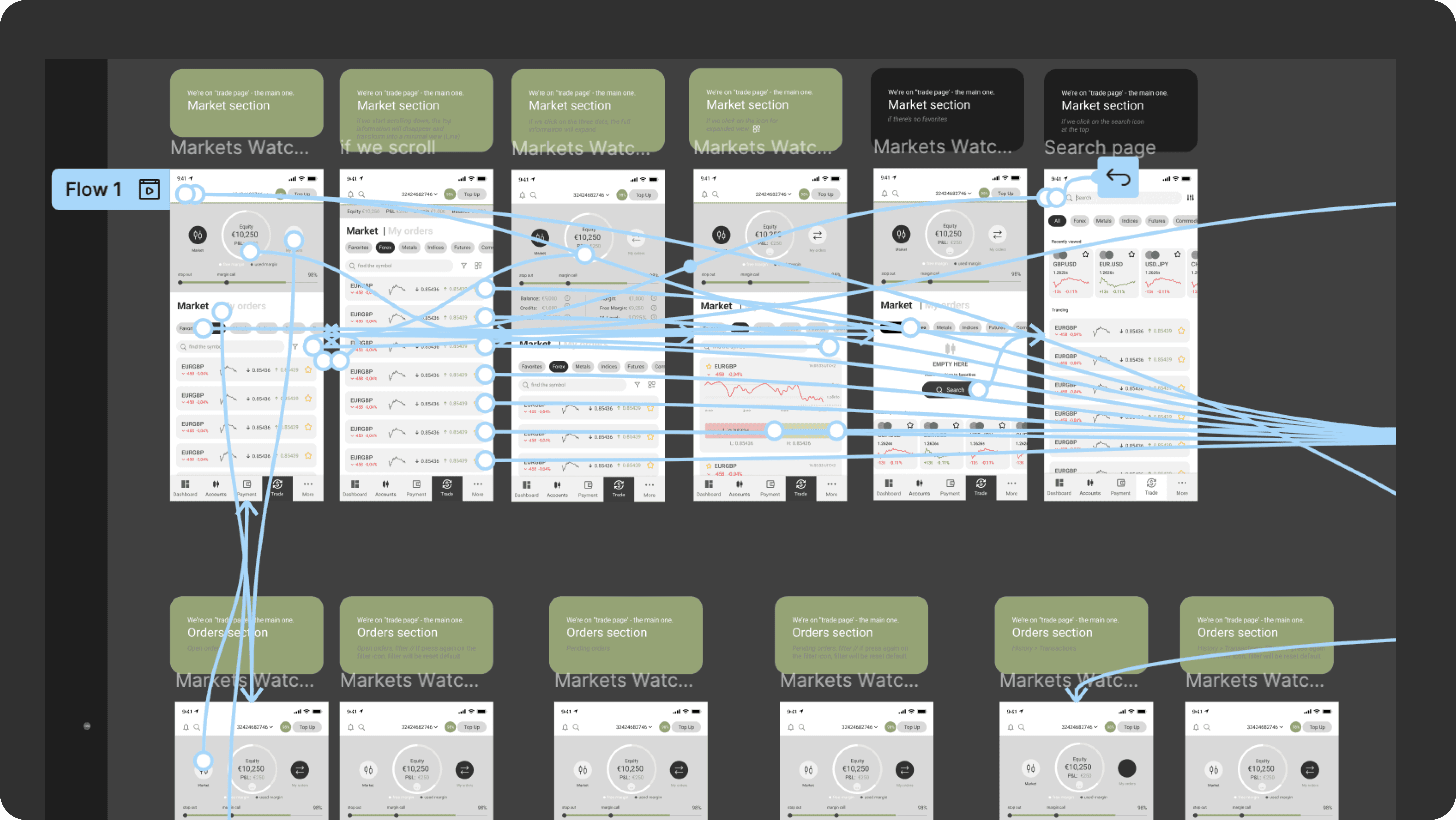
Mapped all key journeys before wireframing: order placement, account switching + deposit, transaction history.
Stage 4: Wireframes & Ideation
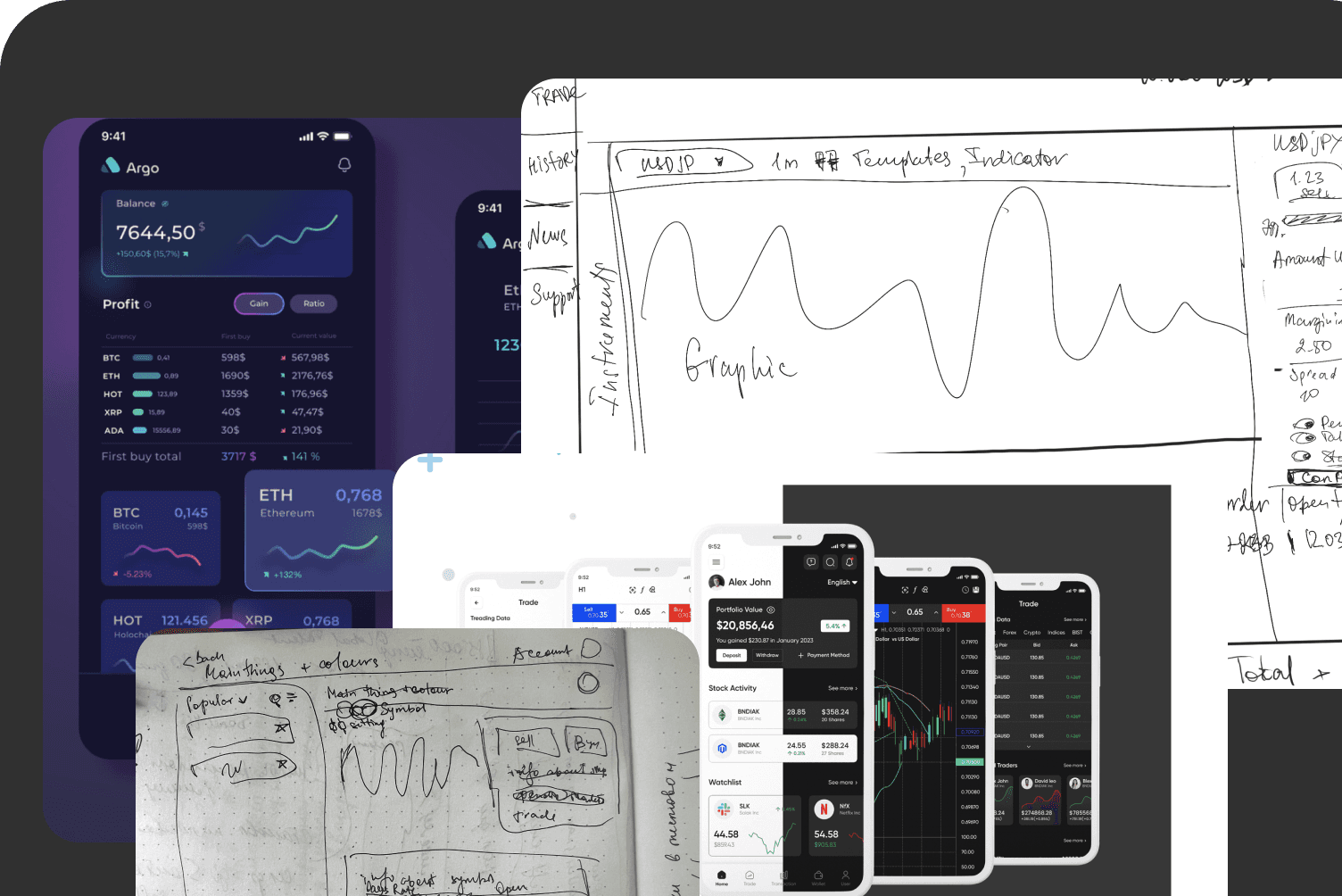
Hand sketches for early ideation. Wireframes with iterations. Explored top bar and order interaction approaches.
Stage 5: Testing & Iteration
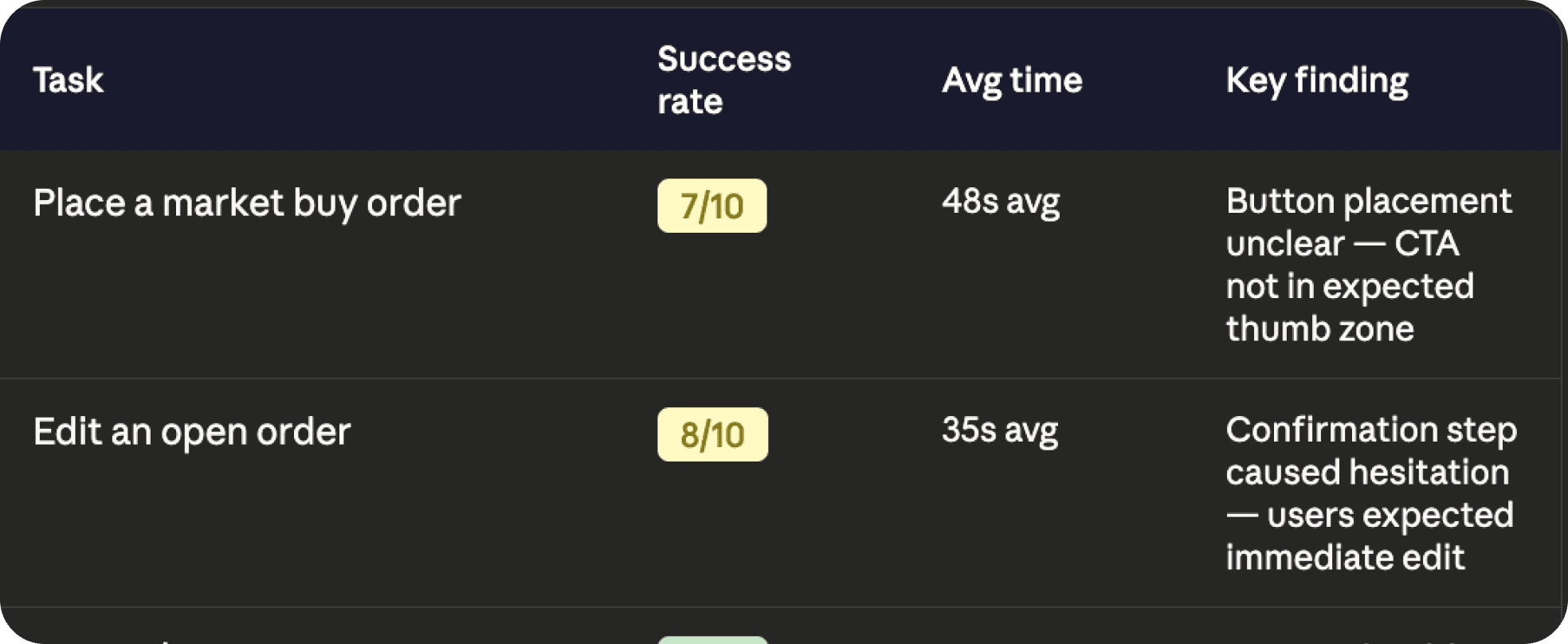
Prototype testing: 10 participants, task-based. Findings by severity. Key flows corrected before visual design.
Stage 6: Visual Design
Final mobile app + web platform. Extended design system. Second round of Userberry testing on final designs.
Stage 1:
Market & Competitor Research
The trading app market is crowded — but most platforms are either built for professionals or feel decades old. Before any design work, I mapped the competitive landscape to understand where the market is moving, what users expect today, and where the company had a real opportunity to differentiate.
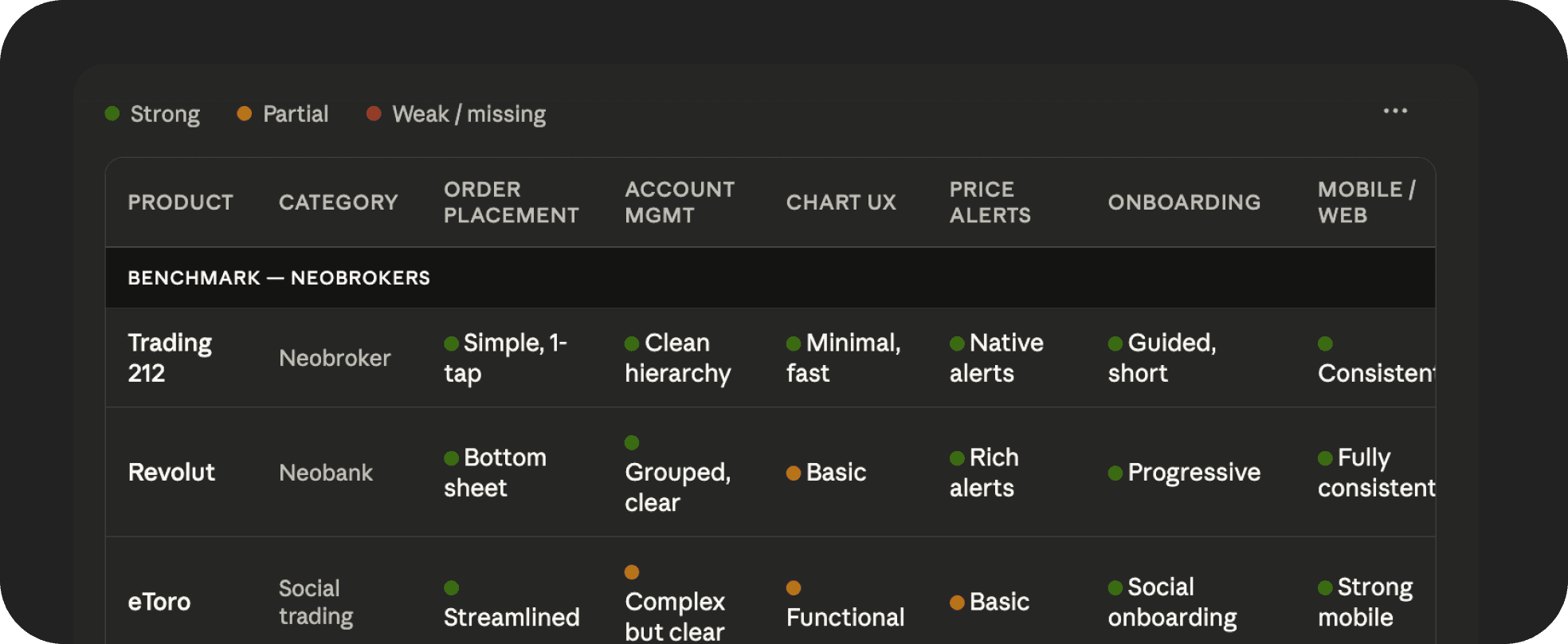
Feature Comparison Matrix — products as columns, criteria as rows, green/yellow/red ratings. Criteria: order placement simplicity, account management, chart UX, price alerts, onboarding, mobile/web consistency.
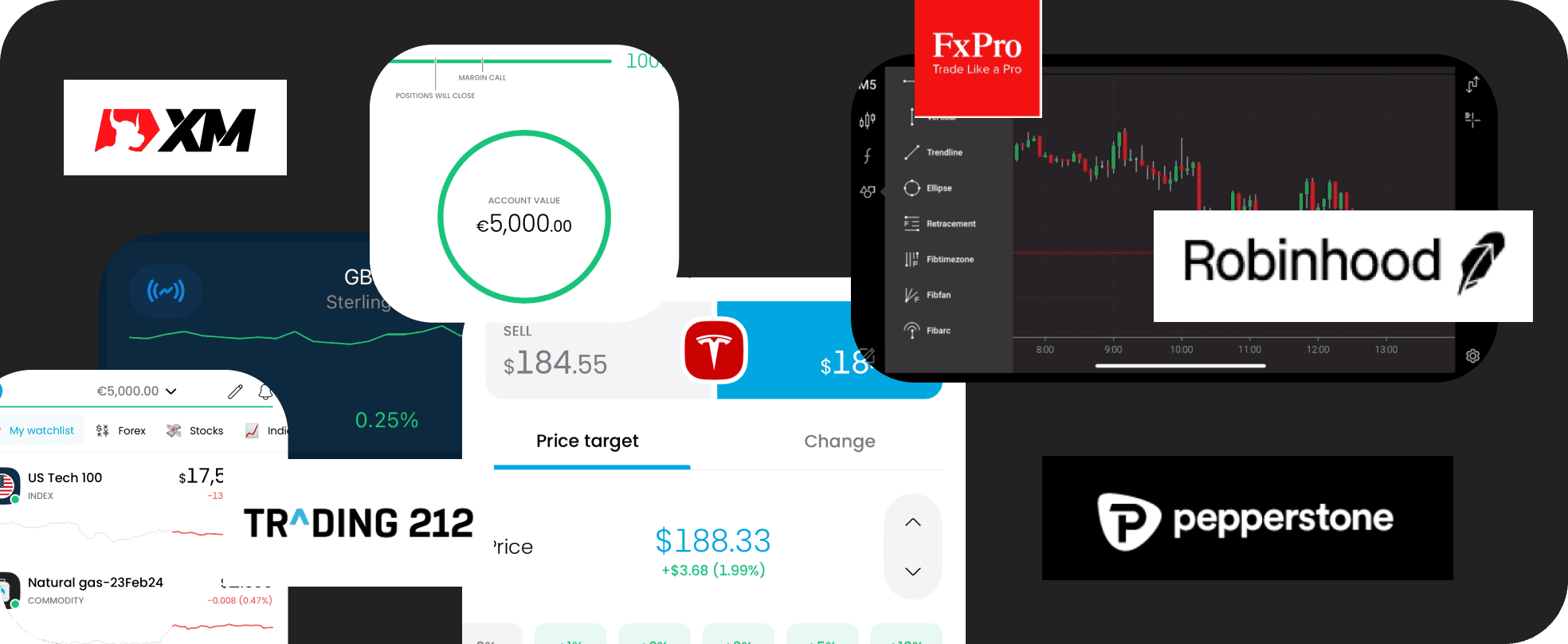
Analysed the full landscape: large brokers, trading-focused apps, neobanks with investing features.
Key Insights
Best experiences use minimal UI — avoid overwhelming users with data they don’t need upfront
Bottom sheet / overlay interactions instead of page navigation keep users in chart context
Card-based information architecture works well for financial data — scannable and hierarchical
A large segment of users are trading beginners — simplicity is a retention lever, not a nice-to-have
Modern platforms are moving away from the dense, Windows-era UI of MT4/MT5
Overlays and floating panels keep trading flow uninterrupted
User Audience
Research identified 8 distinct trader profiles — from novices to algorithmic traders. For MVP, we focused on two priority segments that represented the highest opportunity:
The full audience map informed design decisions across the product — but these two segments defined the core UX priorities.
Novices / Retail Investors
age 18-60, new to trading, no prior experience. Largest untapped segment. Highest risk of drop-off if the interface is complex.

Experienced Brokers
managing multiple accounts across different currencies and strategies. Key revenue drivers. Need speed and data visibility above all else.
Stage 2:
MVP Scoping & Prioritisation
Following market research and audience analysis, I worked with PMs to translate findings into a prioritised feature set.
The goal: define what ships in v1, what comes next, and what stays out — and get stakeholder buy-in before moving to execution.
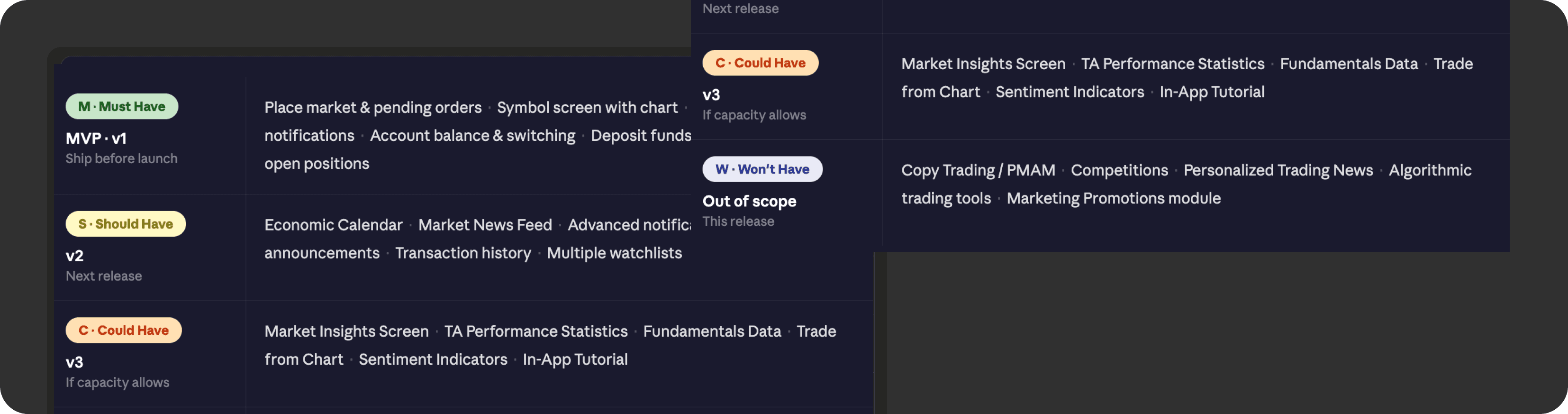
Results:
MVP scope approved by stakeholders — clear v1 boundaries set, team aligned
Dedicated dev team secured — delivery accelerated after months of resource instability
Stage 3: User Flows
Two interconnected flows mapped before any wireframing — shared reference point for design, testing, and dev discussions.
Flows first, visuals second: alignment on logic before investing time in high-fidelity work.
Stage 4:
Wireframes & Ideation
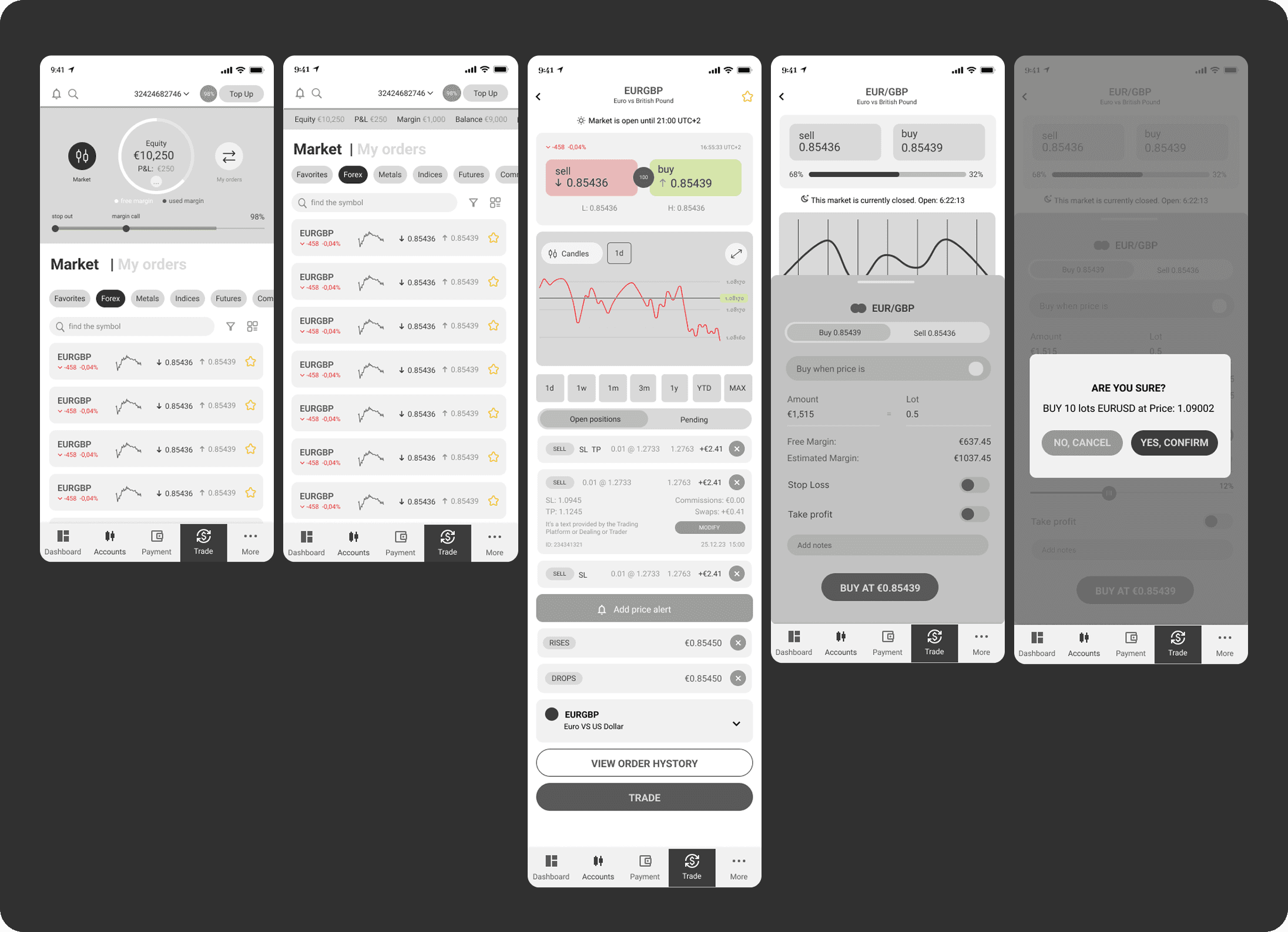
Sketched multiple approaches to the most complex interactions before opening Figma — the top bar and order placement experience. Fast divergent thinking before committing to structure.
Wireframes focused on logic, not visuals: how account data surfaces in the top bar, how the order sheet overlays the chart without losing context, how portfolio cards present complex financial data simply.
Ideation & Scetches
Wireframes
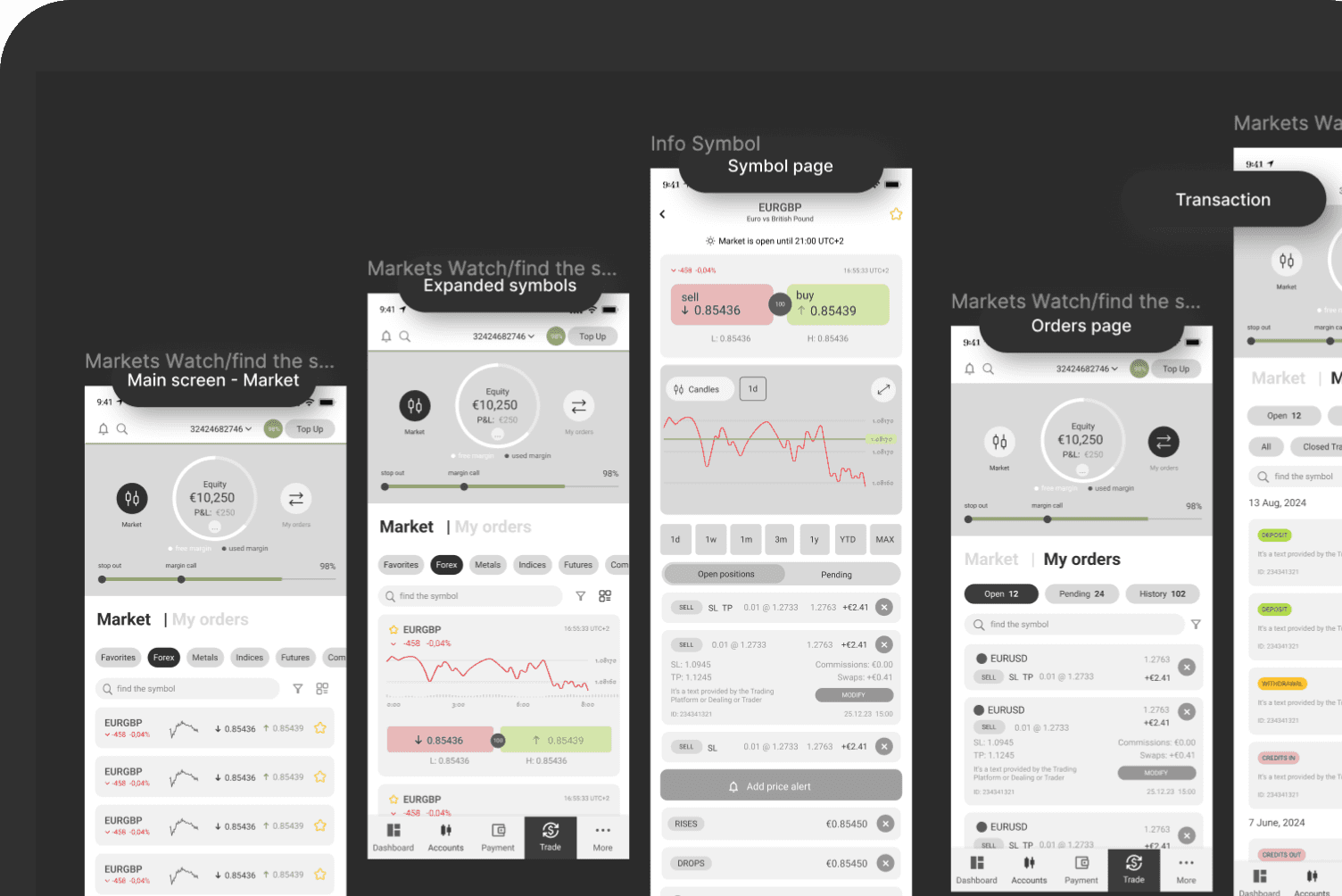
Wireframes
Trading flow
Markets → Scroll → Symbol card → Place order → Confirmation
Wireframes for the core trading flow — focused on structure and logic before any visual decisions. Key challenge: keep the user in chart context while placing an order.
Solved with a bottom sheet overlay that surfaces trade actions without navigating away from the market view.
Stage 5:
Testing & Iteration
Participants & Tasks
10 participants
Hi-fidelity prototype
Task-based without guidance
Moderate - in-person sessions
Three rounds of testing:
Round 1 — Corridor testing · colleagues · prototype · quick early sanity check
Round 2 — Real trader sessions · recruited from personal network · matched target personas · moderated
Round 3 — Userberry · unmoderated + moderated online sessions · design stage
Testing Results — Task Completion
Findings by Severity
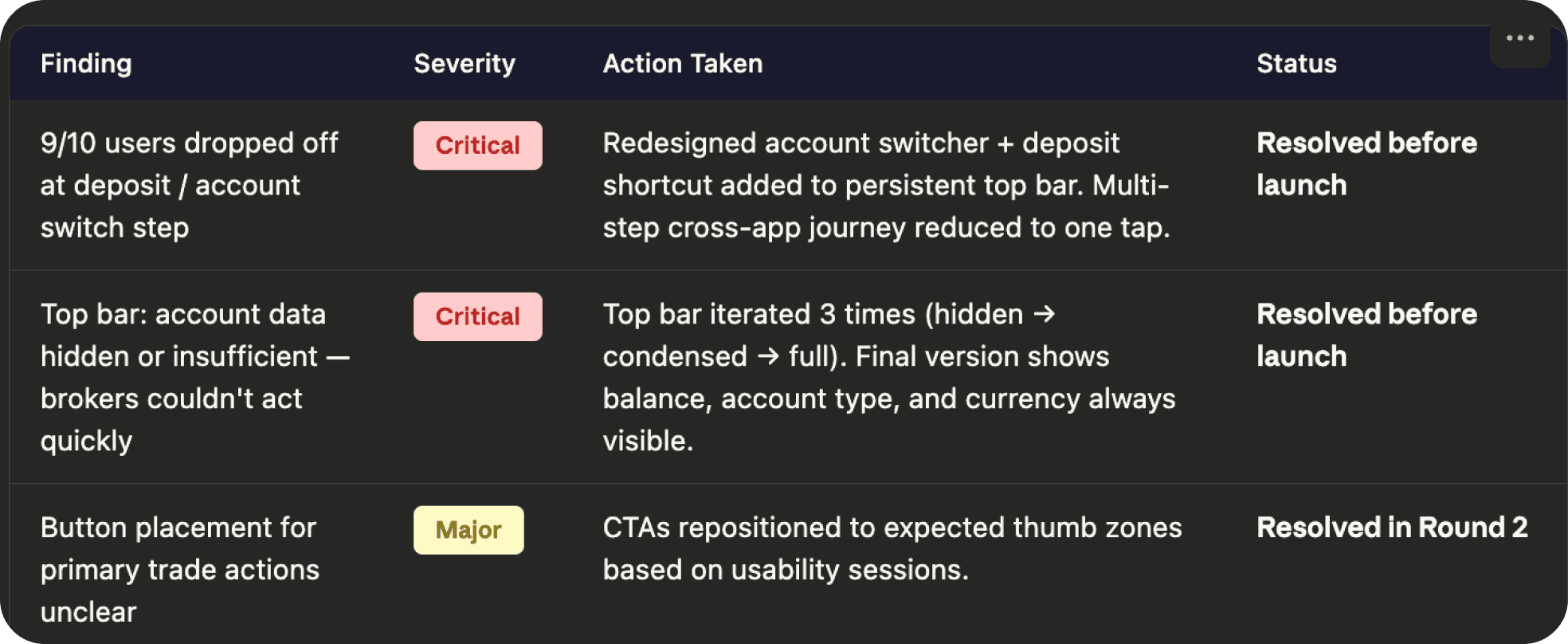
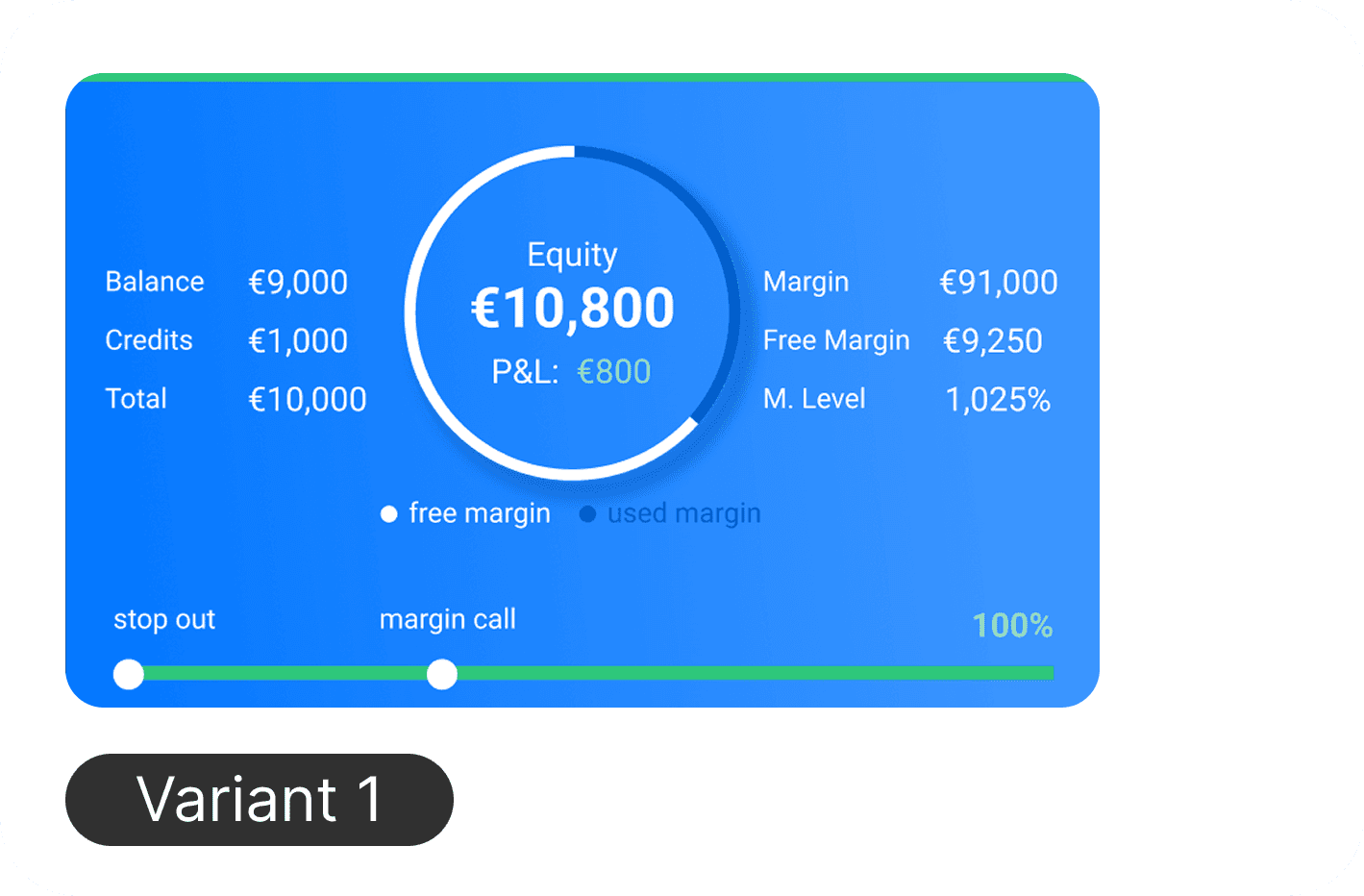
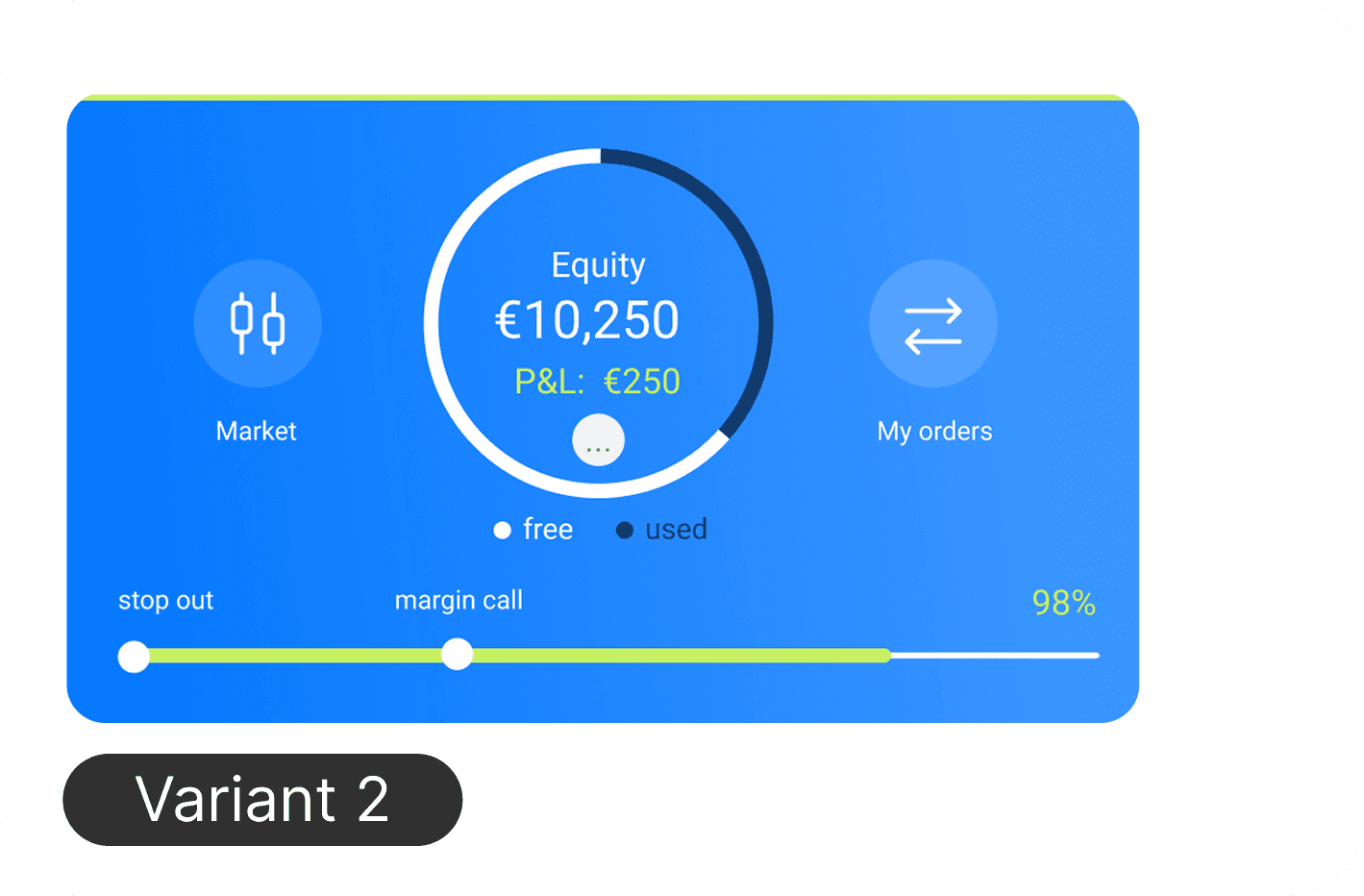
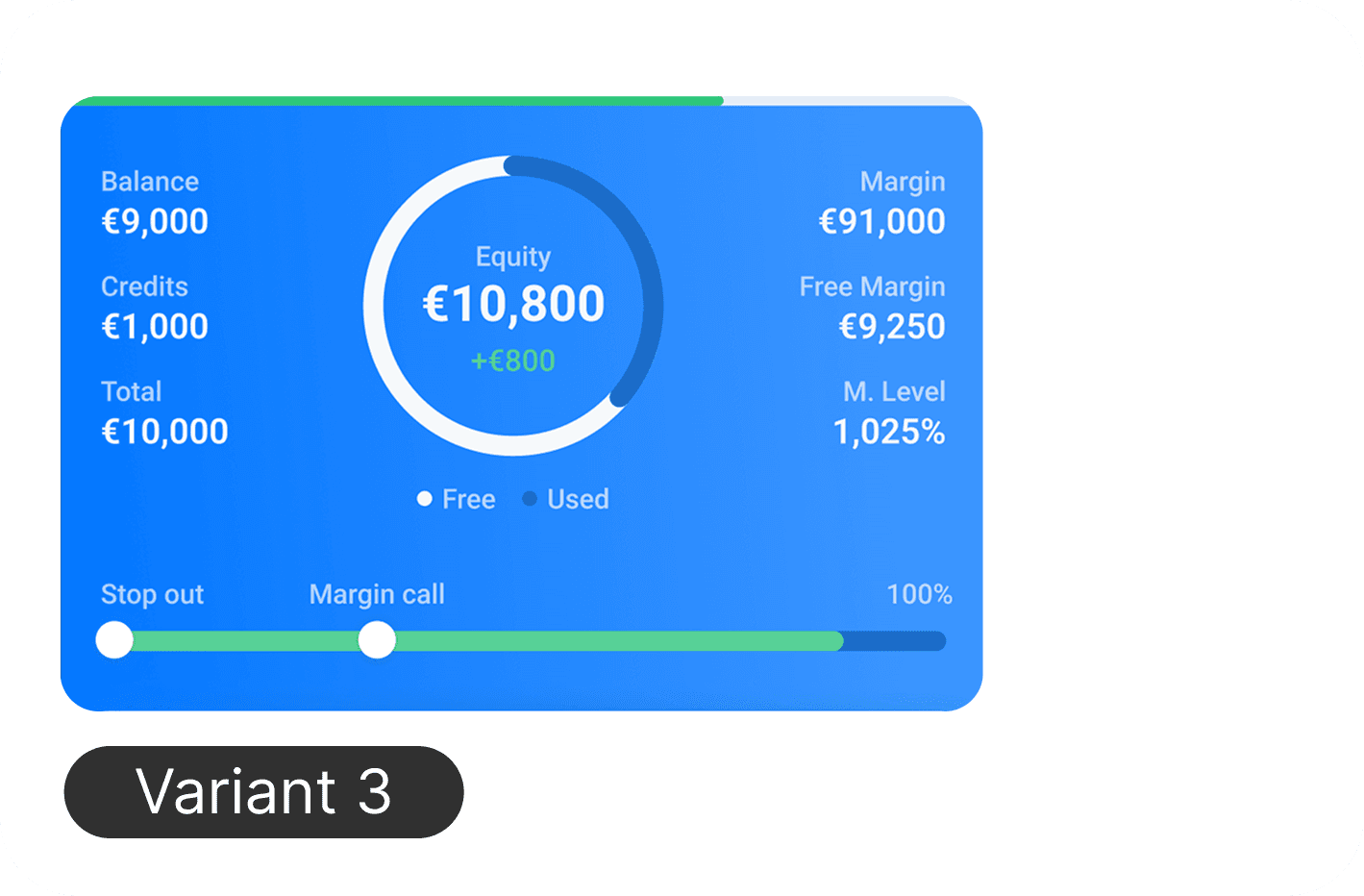
The top bar — showing account data, balance, and switching controls — went through multiple rounds and was rejected by the PM several times. Early versions were either too complex or didn’t surface the right information for a broker who needs to act quickly (this found in testing). The final version was approved without changes and became one of the most praised elements in broker feedback after launch.
What Changed After Testing
Top bar iterated 3 times — tested hidden, condensed, and full data layouts. Full visibility won: brokers need all key account data on screen at a glance
Account switching improved — added more context and data to help brokers identify the right account quickly
Transaction history expanded — users expected full account history, not just trading activity
Order sorting enhanced — more filter parameters added based on how brokers actually manage positions
Labels and titles rewritten — trading terminology was unclear to beginners, copy simplified throughout
Button placement adjusted — CTAs repositioned within symbol/pair info based on usage patterns
Stage 6: Visual Design
Markets → Scroll → Symbol card → Place order → Confirmation
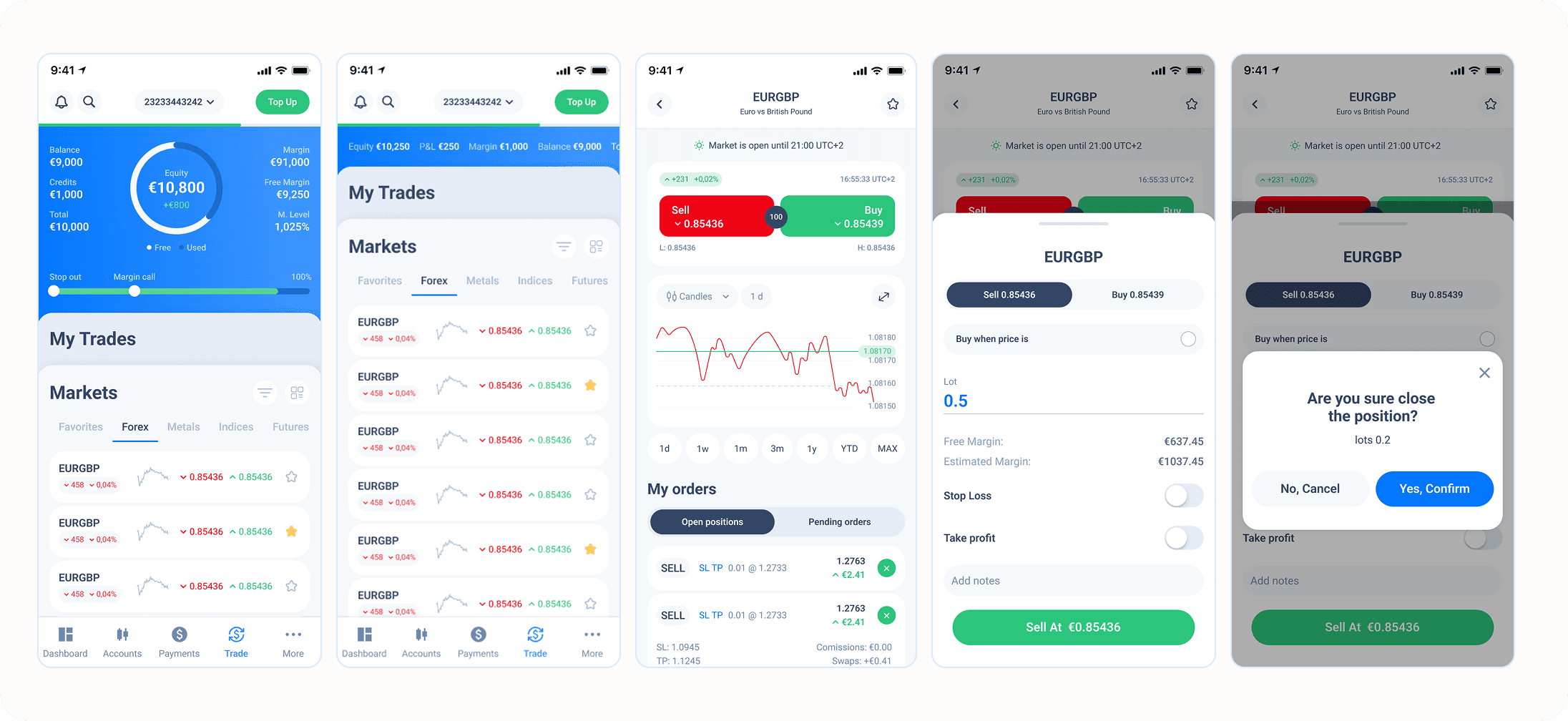
Key Design Decisions
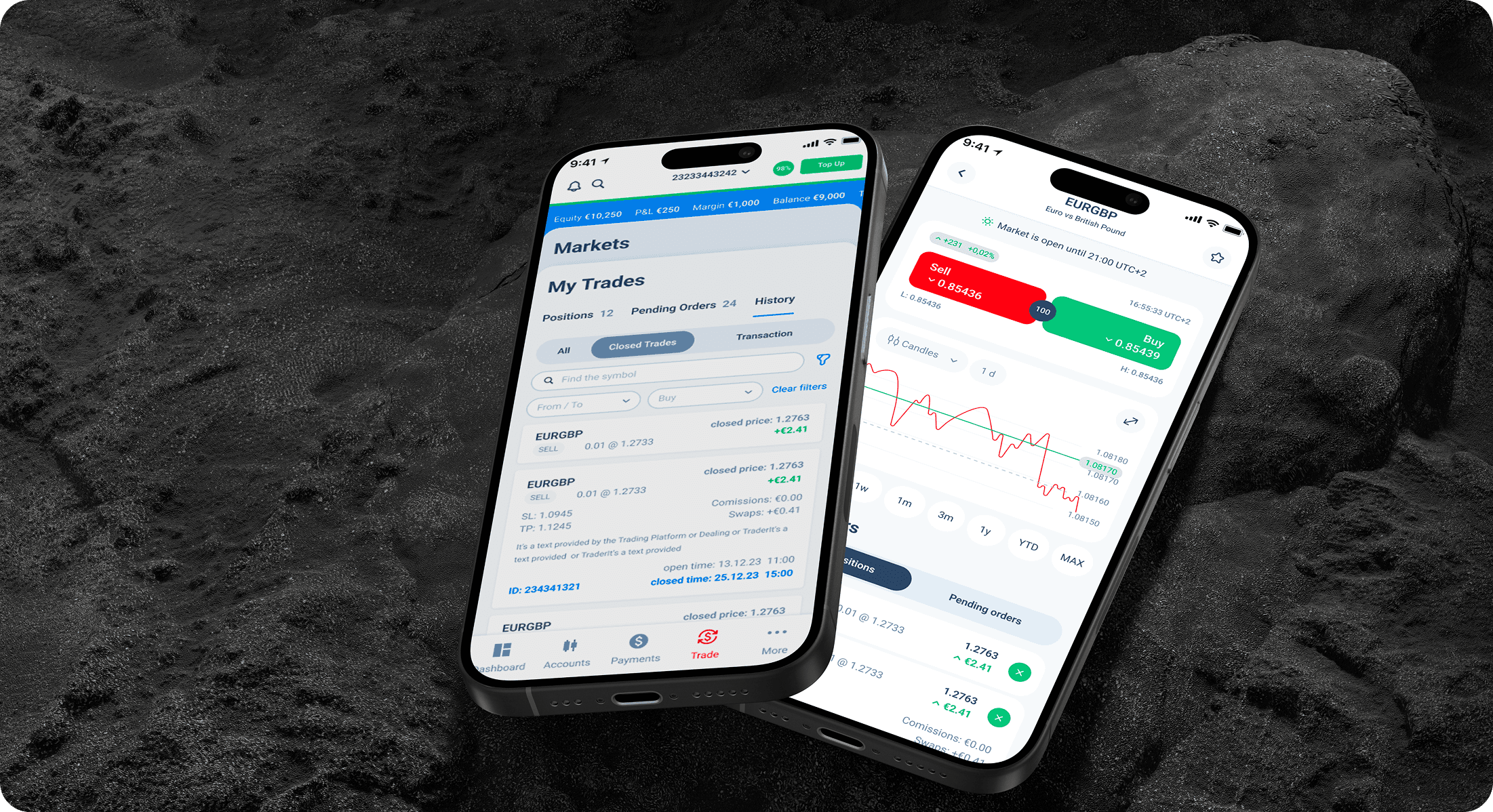
Top bar for account switching: 9/10 users completed the deposit flow after redesign — up from 1/10. Current balance, account type, and currency always visible. Switching in one tap.
Bottom sheet for order placement: Keeps user in chart context without full page navigation. Informed by best practices identified in competitive research.
Action confirmation system — standard confirmation states after each user action, ensuring clarity at every step of the trading flow
Card-based portfolio view: Clean, scannable structure that works for both beginners and professional brokers managing multiple positions.
Intentional design bridge — key elements from the legacy app preserved (navigation icons, core colour tokens) while introducing updated components. A deliberate strategy to gradually evolve the overall product design without a disruptive full redesign.
Design Testing — Round 2
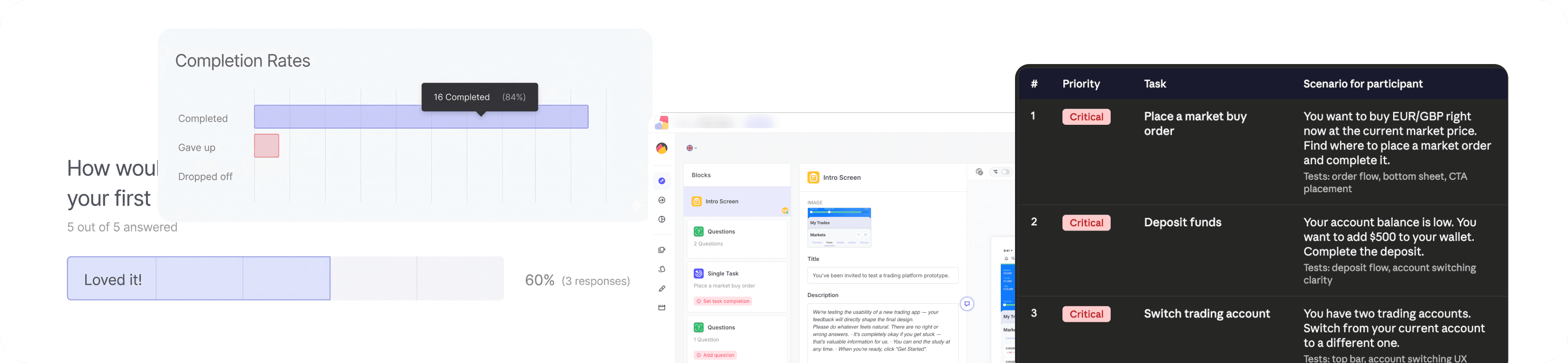
Userberry
Unmoderated
Design was validated through an additional round of Userberry testing. Results confirmed that issues identified and fixed during prototype testing did not reappear. Users completed core flows without critical errors — positive overall feedback received.
Next Step:
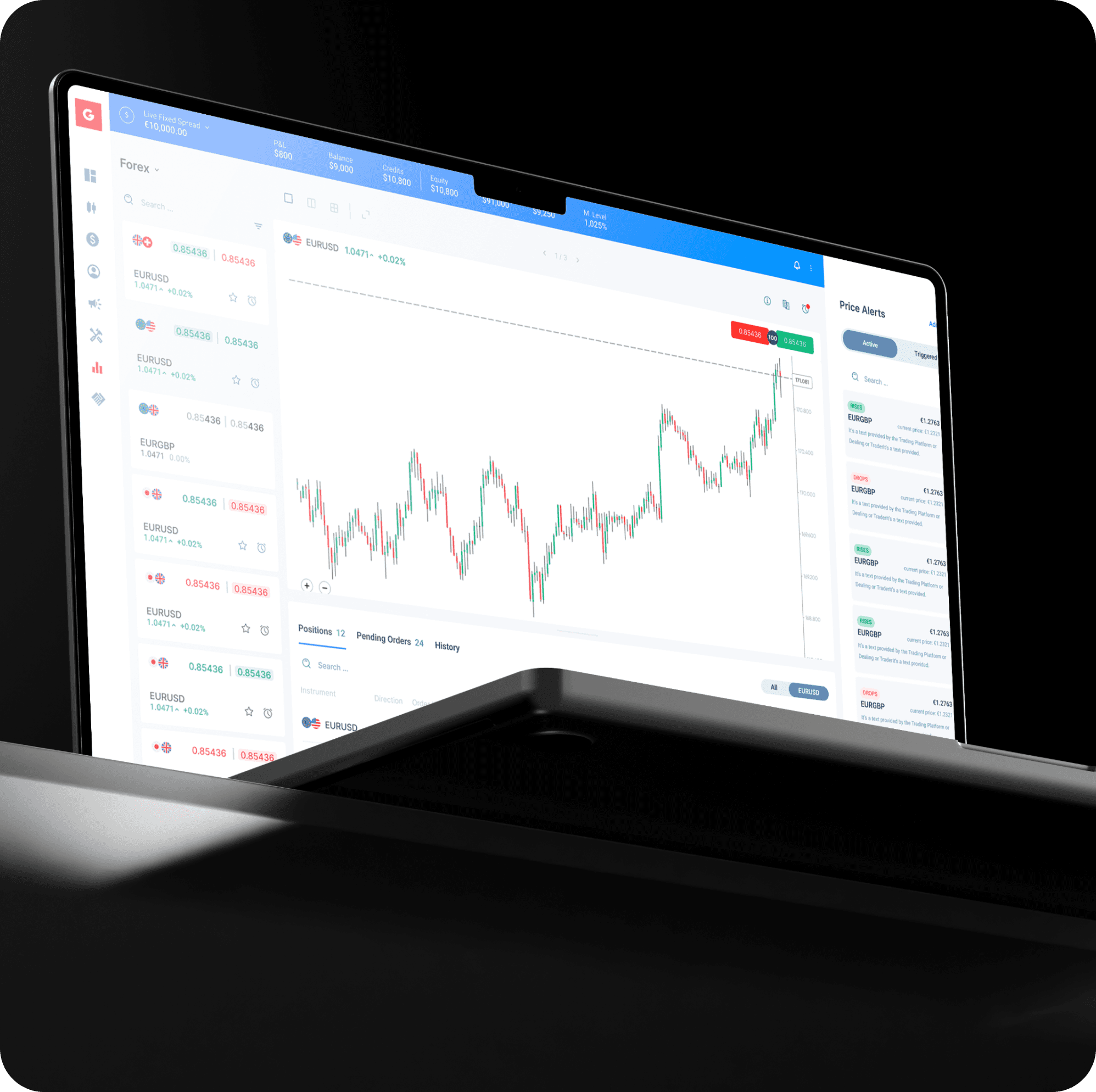
Web Trading Platform
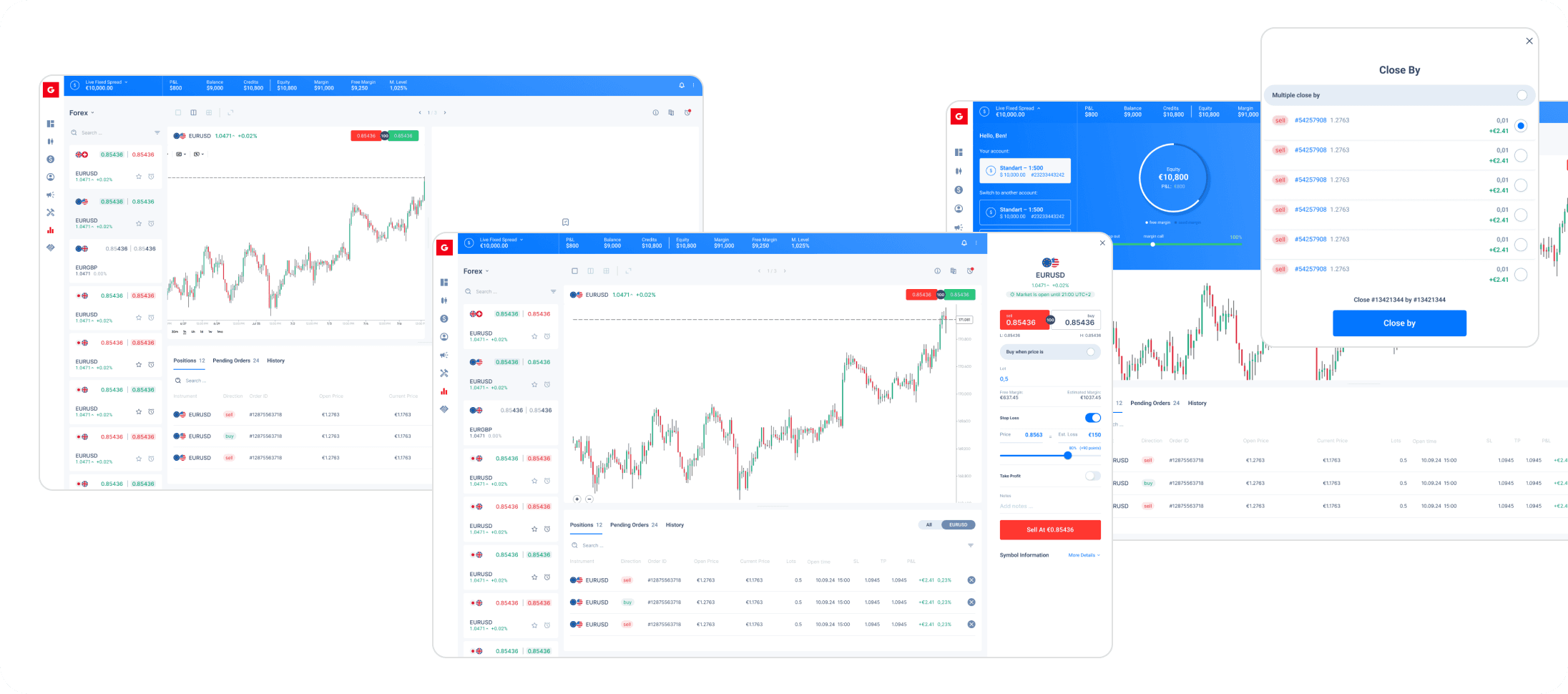
Following the mobile launch, the web platform was designed as a direct continuation — same logic, adapted for desktop. Key challenge: price alerts required completely different interaction thinking on desktop vs mobile.
Shipped to production-ready state in 1 month.
Results & Impact
First-party trading platform launched
For the first time, the company's clients could trade directly within the ecosystem — no need to download or switch to a separate third-party platform.
Foundation for the company’s next phase
Broker reception was strong enough that the business made a strategic decision to redesign all core applications. The trading product proved the direction.
Unlocked next product initiative
No notification system existed post-launch. For a trading product, notifications are direct revenue — price alerts, order fills, margin calls. This became the next priority project and triggered an overhaul of the admin panel.
Business advocacy result
Secured a dedicated development team through stakeholder presentations — directly accelerating delivery after months of resource instability.
Validated by real users
Launched to a select group of key broker partners — each managing hundreds of client traders. 90% reported positive experience post-launch. Brokers immediately requested additional features — a direct signal of product-market fit.
By the numbers
5 steps → 1 tap — account switching reduced after usability data
32 screens delivered in MVP
1 month — web platform shipped to production
90% positive feedback from the initial broker launch group
Did we achieve what we set out to do?
Task completion rate — core flows passed without critical errors in final Userberry testing
Task completion rate: 90% on deposit flow
SUS score — users found the product intuitive enough to replace third-party tools
Feature adoption — brokers actively used the product and immediately requested v2 features
Product generates v2 requests — notification system, Economic Calendar, and advanced analytics added to roadmap
What Came Next: Design Evolution
After launch, I began sketching a unified design direction that would bring the trading interface, main app, and client portal into visual consistency. This work was approved by internal stakeholders and became the starting point for the company’s broader product redesign initiative.
The trading app didn’t just ship — it set a new standard for what the product could be.
Learnings
Notifications are revenue, not a feature
A trading product without a notification system isn't just incomplete — it's actively losing money. Price alerts, order fills, margin calls: each missed notification is a missed transaction. Identifying this gap post-launch became the business case for the next major initiative.
Consistency of logic beats consistency of pattern
Price alerts on desktop required completely different interaction thinking than mobile. The right question isn't "does this look the same?" — it's "does this feel the same to the user?"
Sometimes breaking consistency is the only way to move forward
Introducing updated components that partially broke visual coherence with the legacy design wasn't a compromise — it was a deliberate provocation. Seeing the contrast between old and new in a live product shifted stakeholder thinking in a way that presentations never could. It became the proof that a full redesign was not just possible, but necessary.

Some details are protected by NDA and not included here. If you'd like to learn more about the full process, challenges, and results — feel free to reach out.